Here is our home link!
How to HTML Code
How to structure your code
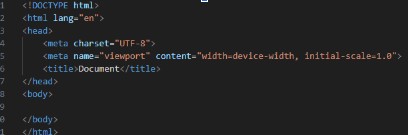
To start the base structure of coding, you need to type ! and press enter. This will create a sequence of code that looks like this.
How to add style to your code
An example of adding color to something is by making a heading and adding color to it.This is a Blue Heading

This code creates a heading that says “this is a blue heading” and it is blue. You can also adjust the specific color that you want by clicking on the box that shows the color and changing it to what you like. This is what the code looks like.
Image sizing with CSS
All you need to do is change either the width or height, and it will automatically adjust the image to the right proportions.
How to add a link
This is what a link looks like Home

This is what the code looks like.
How to embed objects
When you want to embed something like a Coscpace there should be a link in the website. With this you would just copy and paste the code where you want in the body tags. If you were embeding something like an onshape design you would use a webite like sketchfab to make it into a code that could be embeded in.
Adding a document title
To add a title is to add in the actual link of the website. To do this between the head tags you would add the < then a title then >. Below is an example of what it would look like.

Here is how the code would look

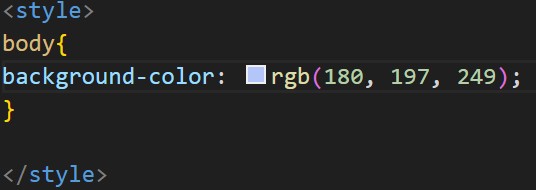
Using style
While using style you start in the body text with < then style > and again. In the style you would use the tag body{ }. After this you can add items such as background color,text colors, and anything else that has to do with the look of your page. This is also known as a class or style class.