You can add a Favicon (the little image that represents the tab next to the name) by using this code:link rel="icon" type= "image/png" href=""( with the greater than and less than signs of couse) In the href section you put your image address.
To add a document title you do this code: title add the greater
To add sound you do this code:

You can take the autoplay and loop things out if you want. The autoplay tag makes it play opon opening of the site and the loop tag makes it play over and over.
You put the name of the mp3 file in the Src section.
Your probaly are thinking, "what mp3 file you can go to Yt5s and paste your url for the youtube video and then you can download it. Of course youtube is blocked so your cooked.
Your code should be in a certain structure for it to work properly. You should have html lang="en" at the very top of you page followed by the head tags ( head /head ), then the body tags ( body /body ), and finally the closing html tag ( /html ). If you want a simpler way to get the basics, you can type exclamation point and enter on your page.
To add or modify certain elements of your website, you can add classes directly to the code, and then style it. To add classes, place the code class="( any word )", your ending code with classes should look like this ( w/less than and greater than ): p class="( any word )". Now that you have that, to use the classes put this code underneath the body tags and enter the custom code you want: style .anyword {styling stuff}
This way of doing the dropdown is different than what is usualy done in this class.
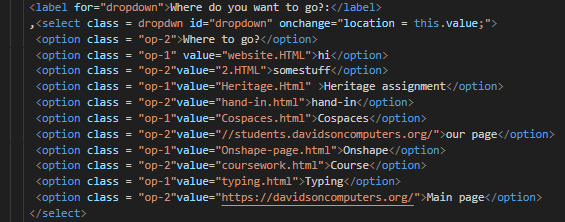
The Label part may not be needed but you add the select tags and then put whatever id and class you want. The "for" part of the label part to match the id though. You then add the option tags for however many options you want and in the value you put the name of the page or web site that you want the section to take you to.
You can use a link to go to an outside site or a different html page. The code is pretty simple: a href="link.html">Word /a. Fill in the link.html with your own link, and fill in the word with whatever you want it to display.